Skip to Content
PETZ
  • 0
    My Cart
  • Home
  • Brands
  • Retailers
  • Support
    • Brand Support
    • Retailer Support
    • Support Team
  • School
  • Contact Us
    Dashboard
PETZ
  • 0
    • Home
    • Brands
    • Retailers
    • Support
      • Brand Support
      • Retailer Support
      • Support Team
    • School
    • Contact Us
    Dashboard
  1. Courses
  2. PETZ Brand
  3. Brand Configuration
Nav
Home └PETZ Brand └Brand Configuration

PETZ Brand

0 %

Completed

Course content
  • Getting Started
    • Brand Configuration
    • Adding Products
    • Create Campaign Template
    • Running a Campaign
    • Adding Media to the Asset Library
    • Creating A Spokespet
  • Coupon Campaigns
    • Dollar Off
    • Quantity Discount
    • Percent Off
    • Bonus Points
    • BOGO at
  • Loyalty Campaigns
    • Rewards Program
    • Frequent Buyer
  • Are You Ready?
    • Funding Your Account
  • Accounting
    • Accounting Card Breakdown

Brand Configuration

Prev Next
Fullscreen Share

Brand Configuration

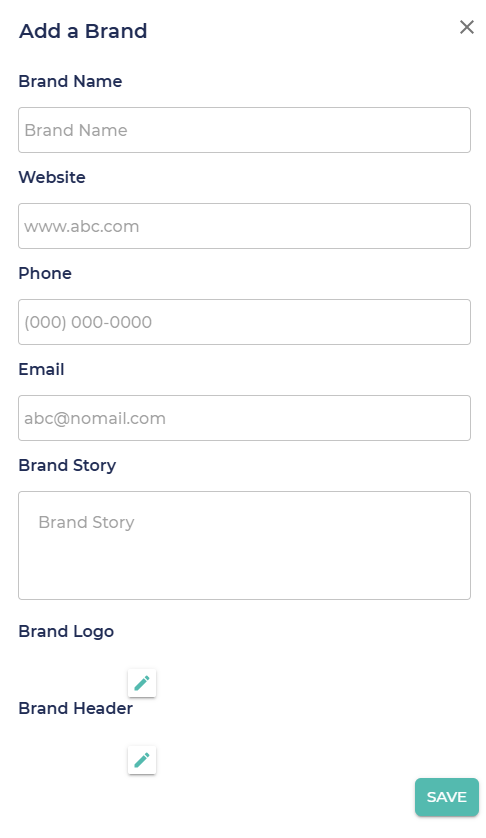
Adding a Brand
Whether it's your only brand or a new member of your brand family we think bringing your brand onto PETZ is a big deal!  So when you decide to do this, we will work with you to have the roll out it deserves. To help you coordinate this, we collect a minimal amount of detail when you click on "Add New Brand" and a PETZ representative will contact you to plan your debut.

A "Default Campaign Limit" is the default dollar amount you would like to limit  the total campaign cost to.  This is configurable at the brand level, but it can be changed on each campaign.

"Coupon Disclaimer" is any custom legal disclaimer you would like add to our existing coupon disclaimer.



  • About
  • Comments


Commenting is not enabled on this course.

  • Home
  • •  Account Portal •
  •  
  • Support
  • •
  • Privacy Policy
  • •
  • Terms of Service
petz-logo
Copyright © PETZ